
TESTS
What it is. The tab that gathers the tests and benchmarks of HYDRA for the processor, memory and graphics card in one place. At the top it shows live sensors of up to two graphics cards.
Why use it. Check that your settings are stable and measure what tuning gives you. Each tile starts a test or opens its saved results.
Tab TESTS
Sections CPU · DRAM · GPU
Updated 1 Nov 2026
The tab
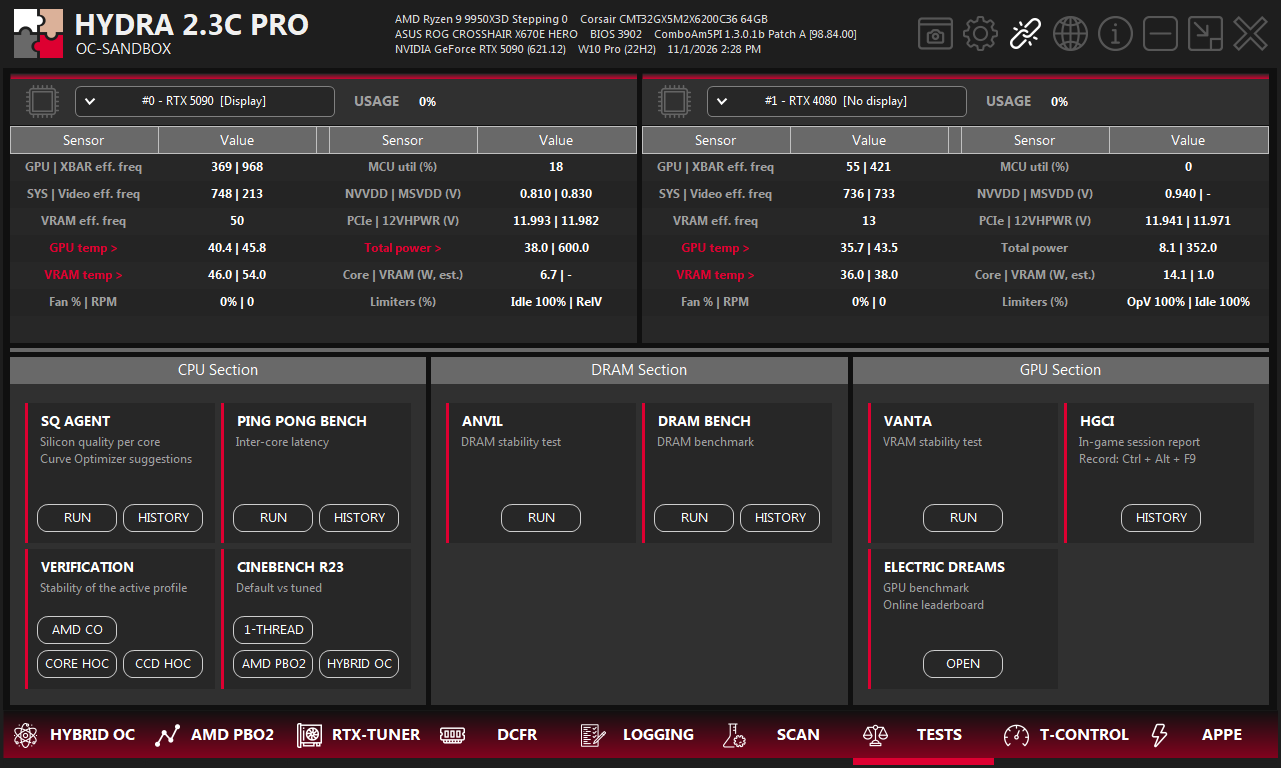
- 1TESTS. The tab on the bottom bar of HYDRA.
- 2Sensors. Live clocks, voltages, temperatures, power and limiters of up to two cards; pick the card in each list. A red name opens a telemetry window.
- 3SQ AGENT. Rates every core and suggests Curve Optimizer values. See SQ AGENT.
- 4PING PONG BENCH. Latency between cores. Not available in this version.
- 5VERIFICATION. Checks that your processor settings are stable. See below.
- 6CINEBENCH R23. The boost of every core and default against tuned performance. See below.
- 7ANVIL. Memory stability test. See ANVIL.
- 8DRAM BENCH. Cache and memory speed, with a history of runs. See below.
- 9VANTA. Video memory stability test. See VANTA.
- 10HGCI. The report of a game session. See HGCI.
- 11ELECTRIC DREAMS. Graphics card benchmark with an online scoreboard. See ELECTRIC DREAMS NIGHT BENCHMARK.
CPU section
| Tile | Button | What it does |
|---|---|---|
| SQ AGENT | RUN · HISTORY | Starts SQ AGENT or opens its latest report. |
| PING PONG BENCH | RUN · HISTORY | Measures latency between cores. Not available in this version: the buttons do nothing yet. |
| VERIFICATION | AMD CO | Checks your user profile from AMD PBO2 and corrects its Curve Optimizer values where it finds errors. |
| VERIFICATION | CORE HOC · CCD HOC | Checks the HYBRID OC values that SCAN CPU found, per core or per CCD, and corrects them where it finds errors. |
| CINEBENCH R23 | 1-THREAD | Loads one core at a time and logs its clock, temperature, voltage and power. |
| CINEBENCH R23 | AMD PBO2 · HYBRID OC | Runs the multi-thread test at default and then with the active AMD PBO2 or HYBRID OC profile, and compares the two runs. |
VERIFICATION
- AMD CO checks your user profile from AMD PBO2 under load: every core in turn, then each CCD, then all cores together. When a test fails, HYDRA weakens the Curve Optimizer of every core on that CCD by 2 and repeats the test. The checked profile goes back to AMD PBO2 and is saved.
- Exceptions. During the test FIT is 1, the reference clock (eCLK or BCLK) is the one set in the SCAN CPU settings, and Curve Shaper on Ryzen 9000 is turned off. After the test, FIT 1 and that reference clock are written to AMD PBO2. If your profile used other values or Curve Shaper, set them again: the test did not check them.
- CORE HOC and CCD HOC check the HYBRID OC result of SCAN CPU, so run SCAN CPU first. On X3D processors they work only on Ryzen 9000.
- Before the test starts, HYDRA waits 30 seconds: press STOP to cancel. The test takes a long time; leave the PC alone until it ends.
- If the PC freezes or restarts, just sign in to Windows: HYDRA starts by itself and continues.
CINEBENCH R23
- 1-THREAD does not change any settings: it measures what is active now. The result appears in LOGGING under HYDRA BOOST TESTER RESULTS, one line per core: EFREQ (effective clock, MHz), TEMP (°C), TEL (voltage from the motherboard telemetry), VID (voltage the core requests) and POW (core power, W).
- AMD PBO2 and HYBRID OC show both scores on a chart next to other processors and log the voltage, power, temperature and clock of each run. After the test HYDRA returns the processor to the state it was in before.
- HYBRID OC needs the MT profile turned on in HYBRID OC.
DRAM section
| Tile | Button | What it does |
|---|---|---|
| ANVIL | RUN | Opens ANVIL, the memory stability test. |
| DRAM BENCH | RUN | Measures cache and memory latency and bandwidth in about 5 minutes and shows the report. |
| DRAM BENCH | HISTORY | Opens the saved reports. You can browse them, rename one, compare two or delete one. |
CautionDuring DRAM BENCH, HYDRA minimizes itself and locks the keyboard and mouse so that nothing disturbs the measurement. This is normal. In an emergency, press Ctrl+Alt+Del to unlock them.
GPU section
| Tile | Button | What it does |
|---|---|---|
| VANTA | RUN | Opens VANTA, the video memory stability test. |
| HGCI | HISTORY | Opens the report of the latest game session. Ctrl+Alt+F9 in a game records a new one; see HGCI. |
| ELECTRIC DREAMS | OPEN | Opens ELECTRIC DREAMS NIGHT BENCHMARK with your runs and the online scoreboard. |
Good to know
- Some tests need a package from APP PACK: Cinebench R23 for CINEBENCH R23, y-cruncher for SQ AGENT and VERIFICATION, Electric Dreams for ELECTRIC DREAMS. HYDRA offers to download a missing package.
- Leave the PC alone during a test: other programs spoil the results. See the golden rules.
- Compare runs only under the same conditions: the same settings, temperature and background programs. Small differences between runs are normal.
Something wrong or missing on this page? Tell us in Discord.