
VANTA
What it is. HYDRA's video memory (VRAM) stability test for NVIDIA and Radeon cards. It fills the free VRAM with test data, reads it back and records every location that returned wrong data. Its schedules are tuned separately for GDDR6, GDDR6X and GDDR7.
Why use it. A memory overclock that looks fine in a game can still corrupt data, reset the driver or quietly lose performance to error correction. Vanta catches such errors directly, so you can check a memory offset from RTX-TUNER or RX-TUNER before you rely on it.
The screen at a glance
The VANTA (VRAM TEST) button in the GPU section of the TESTS tab opens this window. The example is an RTX 4080 with GDDR6X memory and the Custom 1 preset.
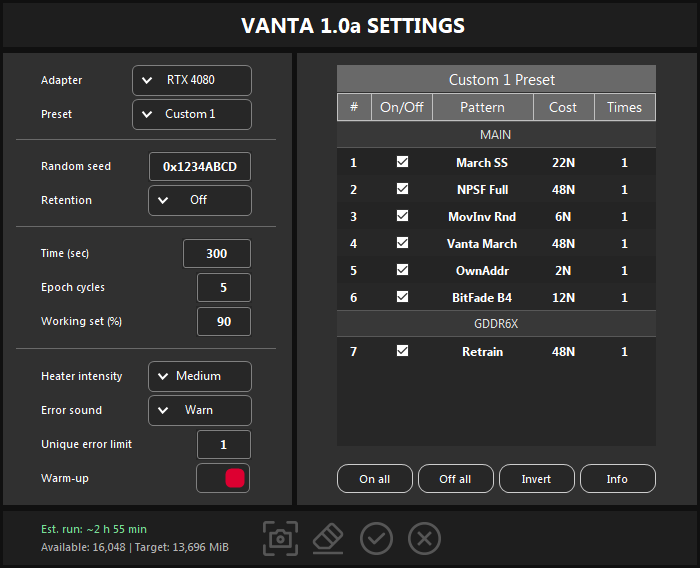
- 1Adapter and Preset. The graphics card to test and the test schedule. See Presets.
- 2Random seed and Retention. Repeatable random data and a pause between writing and checking. See Settings.
- 3Time, Epoch cycles, Working set. How long each pattern runs, how many times the whole schedule repeats and how much VRAM is tested.
- 4Heater, sound, error limit, warm-up. Extra heat for the memory, the error alarm, when to stop and a warm-up before the first pattern.
- 5Pattern table. The patterns of the selected preset with their cost and repeats. See Patterns.
- 6Sections. MAIN for every card and a section for the card's memory type, here GDDR6X.
- 7Table buttons. Turn every Custom pattern on or off, invert the selection, open the pattern guide.
- 8Estimate and memory. The expected run time and how much VRAM is free and will be tested. See Run time and memory.
- 9Buttons. Screenshot, reset to the recommended values, start (Enter), cancel (Esc).
Presets
The Preset list chooses what Vanta runs. Switching presets keeps all numeric settings; the reset button at the bottom applies the recommended values of the selected preset.
| Preset | What it runs | Recommended |
|---|---|---|
| OC Stress | A fixed schedule chosen for the card's maker and memory type and aimed at overclocking errors. It cannot be edited. | 60 s, 5 cycles |
| Custom 1–3 | Three slots for your own pattern sets. Each enabled pattern runs for Time × Times. Reset restores the recommended set. | 30 s, 3 cycles |
| XBAR | NVIDIA only. Loads the crossbar (XBAR) clock domain with two automatic profiles that alternate 10 seconds of load with about 4 seconds of rest. Time is the total test time, at least 30 seconds. | 300 s |
What OC Stress runs
| Card | Patterns |
|---|---|
| GeForce with GDDR6 | Modulo20, MovInv Ph, Game Load |
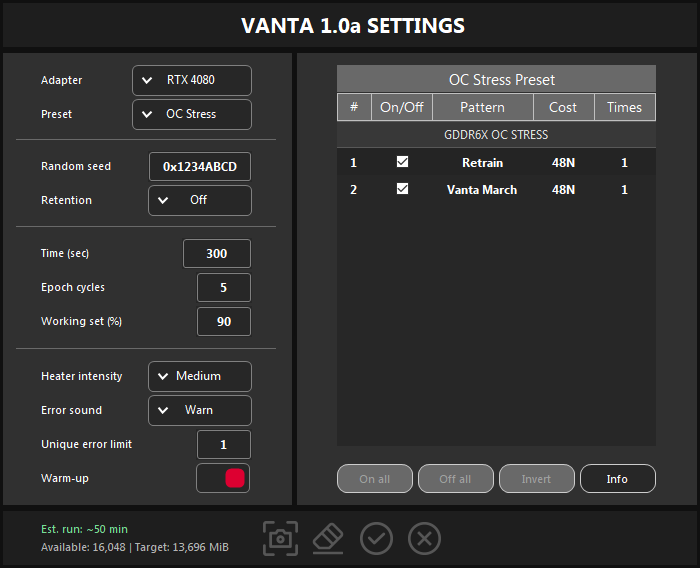
| GeForce with GDDR6X | Retrain, Vanta March |
| GeForce with GDDR7 (experimental) | Retrain, Vanta March |
| Radeon with GDDR6 | ReadStorm, PairComp, WordRep |
With the recommended 60 seconds and 5 cycles, OC Stress takes 10 to 15 minutes.
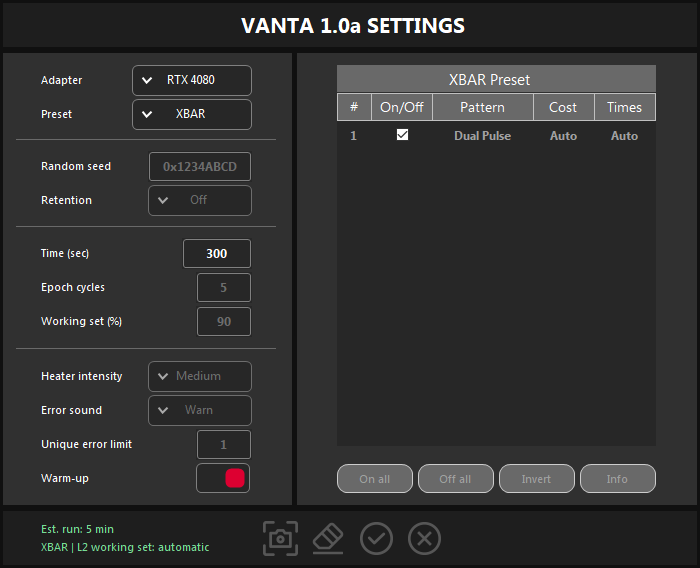
XBAR writes a session journal to LOGS\XBAR in the HYDRA folder.
Patterns
For a Custom preset the table lists the patterns you can run. The On/Off box selects a pattern, Times (1 to 10) runs it again as a separate full-length run, and Cost shows how much reading and writing it does: N is one full pass over the tested VRAM. Cost is work, not fault coverage.
The table shows MAIN and the section for the selected card's memory type. The recommended set has all six MAIN patterns, plus Retrain on GDDR6X and GDDR7 cards or ReadStorm, PairComp and WordRep on Radeon.
| Pattern | Section | What it checks | Cost |
|---|---|---|---|
| March SS | MAIN | Single-cell faults, with the March SS sequence. | 22N |
| NPSF Full | MAIN | Faults that depend on the neighbouring cells: a 4×4 neighbourhood on all 16 backgrounds. | 48N |
| MovInv Rnd | MAIN | Data-dependent faults, with random data. | 6N |
| Vanta March | MAIN | 12 data sequences and their complements in a March chain, with scattered reads and writes. | 48N |
| OwnAddr | MAIN | The address decoder: every location stores a value made from its own address. | 2N |
| BitFade B4 | MAIN | Retention: whether cells keep their data over time (VRT), on 6 backgrounds. | 12N + pauses |
| ReadStorm | GDDR6 | A linear write and 3 verify reads of rotated data. | 4N |
| PairComp | GDDR6 | Static bytes in complementary sector pairs, read 7 times. | 8N |
| WordRep | GDDR6 | A repeated rotated word with a 4-byte period, read 7 times. | 8N |
| TogStorm2 | GDDR6, NVIDIA | Rotated data with a delayed scattered verify and a reread. | 2N |
| Game Load | GDDR6, NVIDIA | Rotated data written in reverse order and read back rotated. | 2N |
| Retrain | GDDR6X, GDDR7 | A 4-second pause lets the memory clock drop; a 10-second Vanta March burst then runs right after the memory retrains at full speed. | 48N |
| MovInv Ph | OC Stress, GeForce GDDR6 | 8 phase pairs: DQ and PAM4 symbol transitions. | 48N |
| Modulo20 | OC Stress, GeForce GDDR6 | A stride-20 write and verify, inverted every other pass. | 2N |
Settings
| Setting | What it does |
|---|---|
| Random seed | The start value for random data, in hex (0x…) or decimal. The same seed gives the same data, so a run can be repeated exactly. |
| Retention | A pause between writing data and checking it: Off, or 1 ms to 90 s. Longer pauses catch weak cells that slowly lose their data. 10 s or more suits deep BitFade testing; BitFade always waits at least 250 ms. |
| Time (sec) | How long each pattern runs, from 1 to 86,400 seconds. With XBAR it is the total test time. |
| Epoch cycles | How many times the whole schedule repeats, from 1 to 999. |
| Working set (%) | The share of free VRAM to test, from 1 to 100. 90 % leaves room for Windows and the drivers. |
| Heater intensity | Extra GPU core load that warms the memory through the board: Off, Light, Medium, Heavy or Extreme. Medium is the default, because most coolers otherwise keep VRAM too cold. Lower it if bandwidth drops by more than 15 %. |
| Error sound | The alarm for new errors: Off, Warn, Error or Beep (Windows sounds). The chosen sound plays once as a preview. |
| Unique error limit | Vanta stops after this many different error locations, from 1 to 999,999. With 1 it stops at the first error. |
| Warm-up | Up to 180 seconds of warm-up before the first pattern, until the memory temperature and fan speed settle. Recommended for retention and BitFade testing. |
With XBAR only Adapter, Preset and Time can be changed. The settings and Custom pattern sets are kept when you start a run; Cancel discards the changes.
Run time and memory
- Est. run is Time × the sum of Times × Epoch cycles. In the screenshot: 300 s × 7 × 5 = 2 h 55 min. OC Stress on the same card: 300 s × 2 × 5 = 50 min.
- The estimate does not include starting the test or the warm-up. Retention pauses and passes that finish after the time is up can make the run longer.
- Available is the VRAM Vanta can take right now: the smaller of free VRAM and free system commit memory. Memory held by games and other apps is not tested, so close them first.
- Target is what will be tested: Available minus an 800 MiB reserve, times Working set, rounded down to 128 MiB. In the screenshot: (16,048 − 800) × 90 % ≈ 13,696 MiB.
Run and read the result
- Close games and other apps that use the graphics card.
- Choose the card and the preset, check the settings, and click the check mark or press Enter.
- HYDRA switches to the LOGGING tab, locks its controls and keeps the PC awake until the run ends.
Every pattern run ends with one line in the log:
<pattern>: PASS, <seconds>s, ERR <errors>, ITER <passes>, BW <GB/s>| Field | Meaning |
|---|---|
| PASS, FAIL | The result of this pattern run. |
| ERR | Errors found in this run. |
| ITER | Completed passes. |
| BW | Average memory bandwidth. |
At the end HYDRA writes a summary line:
| Summary | Meaning |
|---|---|
| PASSED | Every pattern passed: no errors in this run. |
| FAILED | Errors were found. The lines below list the errors of each pattern. |
| STOPPED | The run stopped before the end, without errors. |
| FINISHED | The run ended, but not every pattern completed; the line gives the reason. |
- Vanta stops as soon as the number of different error locations reaches the Unique error limit.
- On NVIDIA cards that report ECC corrections, a new correction also fails the run (
ECC error detected). - If Vanta finds errors after a memory overclock, lower the memory offset in RTX-TUNER or RX-TUNER and run the test again.
Something wrong or missing on this page? Tell us in Discord.