
APPE
What it is. Advanced Power Plan Editor: an editor for the HYDRA power plan with 69 hidden Windows processor settings that the usual power options do not show, such as core parking, how fast the processor raises and lowers its performance state, and the balance between speed and energy.
Why use it. These settings decide how quickly the processor reacts to a sudden load and how much power it uses at rest. APPE lets you tune them, while your own Windows plans stay untouched: HYDRA switches back to your plan when it closes.
Settings 69 hidden processor parameters
Plan HYDRA
Tab APPE
Updated 30 Oct 2026
The HYDRA power plan
- HYDRA creates a plan named HYDRA as a copy of High performance. Without it, HYDRA copies Balanced or your active plan. Your own plans are not deleted or changed.
- A new HYDRA plan starts with core parking off.
- While HYDRA runs, Windows uses the HYDRA plan. When HYDRA closes, it switches back to the plan you had before.
- APPE changes only the HYDRA plan.
The screen at a glance
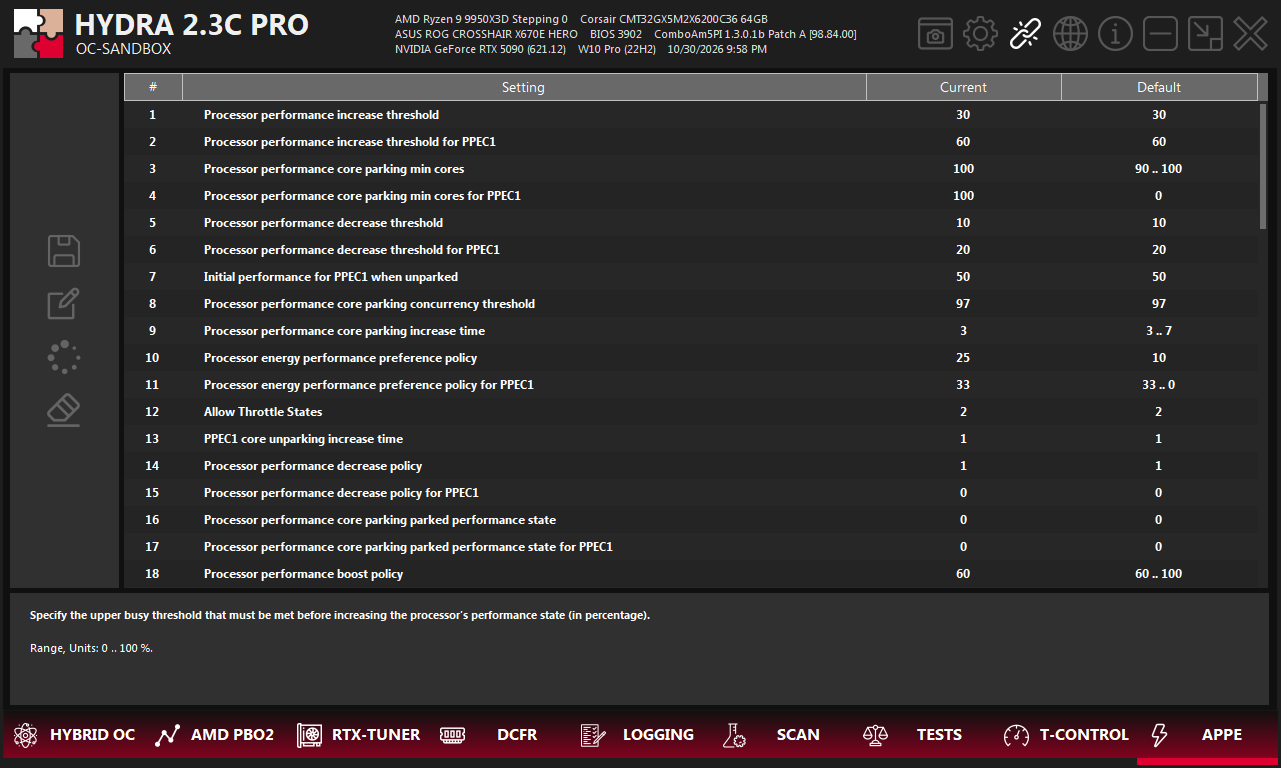
- 1APPE. The tab on the bottom bar of HYDRA.
- 2Buttons. Save, export, import, reset.
- 3Setting. The Windows name of the parameter.
- 4Current. The value in the HYDRA plan. Click it to edit.
- 5Default. The reference value. A range such as
90 .. 100means it differs between systems. - 6Description. What the selected setting does, its range and units.
Edit and save
- Select a setting and read its description and range at the bottom.
- Type a new value in Current. HYDRA accepts only values inside the allowed range and step.
- Click Save. The floppy icon lights up white while there are unsaved changes.
| Button | What it does |
|---|---|
| Save | Writes your changes to the HYDRA power plan. |
| Export | Saves the HYDRA power plan to a file, to keep or share. |
| Import | Loads a HYDRA power plan from a file. |
| Reset | Returns the HYDRA power plan to its defaults. |
Good to know
- While T-CONTROL manages the power plan, APPE is locked. It unlocks when T-CONTROL lets go.
- On Modern Standby systems the HYDRA plan does not appear in Windows Settings, and the Windows power mode slider may override the energy preference settings.
- If a group policy locks the active power plan, HYDRA cannot switch to its plan and says so in the log.
Something wrong or missing on this page? Tell us in Discord.