
SQ AGENT
What it is. A test that loads the processor, measures every core and rates how evenly the cores of each CCD behave: the voltage they ask for, their temperature, power and clock. Then it runs each core on its own and draws its voltage, temperature and power against the clock. The report suggests small Curve Optimizer corrections for the cores that stand out.
Why use it. To balance the cores. Under an all-core load the weakest core holds back all the others; SQ AGENT shows which core it is and how much Curve Optimizer evens it out, and you accept the correction with a double-click. The same measurements reveal the silicon quality of every core and problems with heat transfer or increased leakage current.
What SQ AGENT reveals
Under an all-core load every core works at once inside one budget of power, current and temperature. A core that needs more voltage than its neighbors for the same clock draws more power and heats more, so the processor reaches its limits sooner and lowers the clock of all cores. The aim is even curves: no core of a CCD should be the bottleneck of all-core performance.
| What it reveals | Where to look |
|---|---|
| Bottleneck cores | CO suggestions in TUNE, ΔVID in DETAILS and on the curves: a core that asks for more voltage than its neighbors at the same clock. |
| Silicon quality | EF/1V and the VID request curves: a better core reaches the same clock at a lower voltage. ISO rates the clock a CCD gives for its power; CPPC shows whether the factory core ranking matches the measurement. |
| Heat transfer and leakage | Thermal Match, THM and TDE, and the ΔTemperature and ΔPOW curves; see Heat and leakage. |
Running the test
- Set up the AMD PBO2 tab the way you want to test it. SQ AGENT turns AMD PBO2 on for the run and uses its limits, Fmax and Curve Optimizer values.
- Open the TESTS tab and click SQ AGENT in the CPU section.
- Wait for the report. The log shows each stage; STOP ends the run.
The run has two parts:
- All cores. y-cruncher loads every core. HYDRA waits until the temperature settles, from 30 to 90 seconds, then measures for 40 seconds. The scores and CO suggestions come from this part.
- Core curves. Each core runs alone, one thread, best CPPC core first, with two y-cruncher loads: N63 and SFTv4. HYDRA lowers Fmax and raises it again in 50 MHz steps up to the Fmax of the profile, at most 5950 MHz. N63 covers the top 600 MHz; SFTv4 starts 400 MHz lower. Each step settles for 2 seconds and is measured for 6 seconds. A load stops early when the clock no longer rises: a plateau.
At the end HYDRA restores Fmax, switches AMD PBO2 off and opens the report.
The report
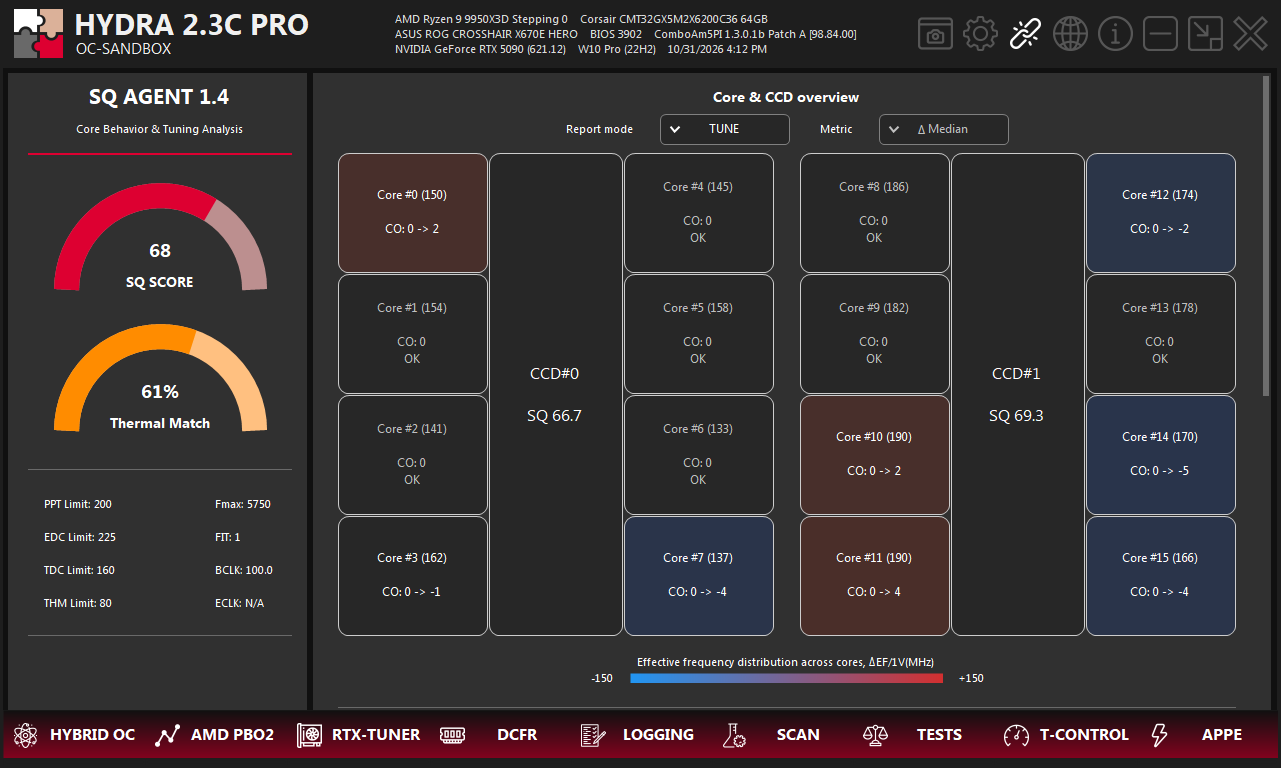
- 1SQ SCORE. The main result for the whole processor, from 0 to 100; higher is better. It rates how evenly the cores behave, not FPS or clock speed.
- 2Thermal Match. How evenly the cores heat up, the THM value of the weaker CCD. A low value means some cores run clearly hotter: check the cooler contact and their CO.
- 3Settings of the run. PPT, EDC, TDC and THM limits, Fmax and FIT of the AMD PBO2 profile, and BCLK and ECLK measured during the run. ECLK shows N/A when the external clock is not in use.
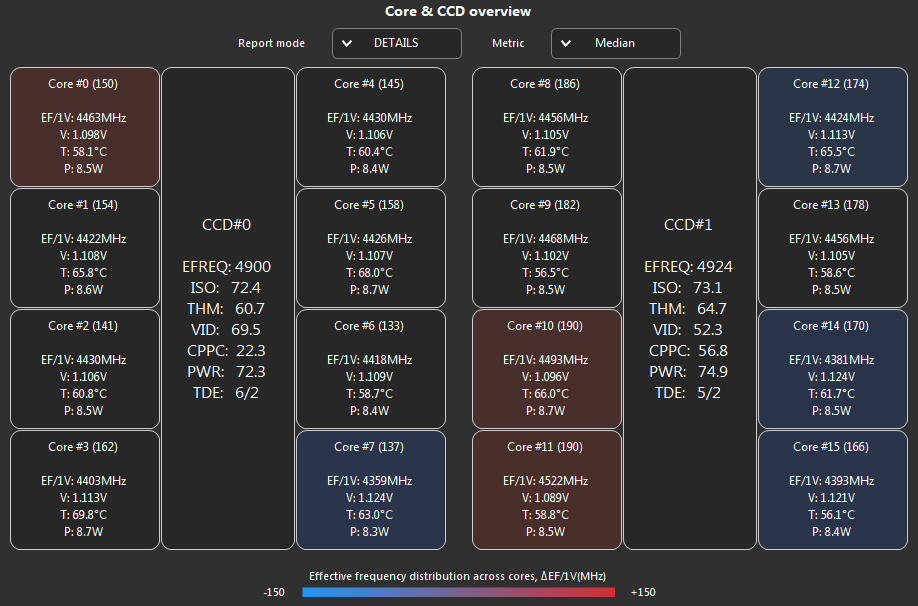
- 4Report mode. TUNE shows CO suggestions; DETAILS shows the measurements behind them.
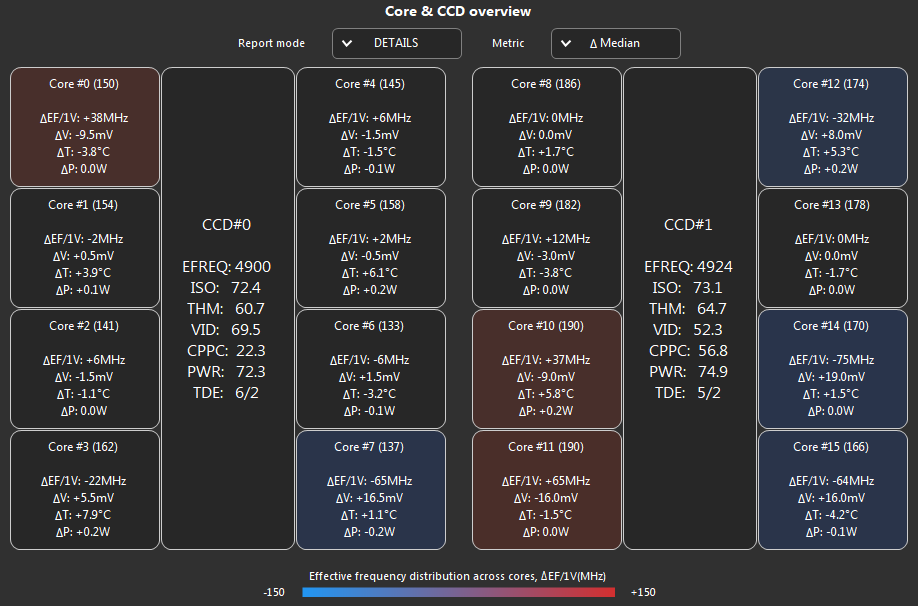
- 5Metric. In DETAILS: Median shows the measured values, Δ Median the difference from the typical core of the same CCD.
- 6Core tile. The core number and its factory CPPC tag in brackets; a higher tag usually means a preferred core.
- 7CCD tile. The SQ score of one CCD in TUNE, or its parts in DETAILS. Read-only.
- 8Tile color. Clock per volt of the core against the typical core of its CCD, from −150 MHz (blue) to +150 MHz (red). A hint, not a pass or fail.
SQ AGENT HISTORY next to the SQ AGENT button opens the last saved report without a new run. Only the latest result is kept, in RESULTS\ResultsQualityBench.json.
CO suggestions (TUNE)
A core tile shows CO: old -> new when SQ AGENT suggests a change, or OK when the core is close to its neighbors.
- The suggestion compares the voltage (VID) the core asked for under the all-core load with the typical core of the same CCD: about one CO step for every 4 mV of difference. Differences under 5 mV are ignored.
- A core that asks for more voltage than its neighbors gets a more negative CO; one that asks for less gets a less negative CO.
- Cores below the median move up to it as well: the aim is even curves across the CCD, not the lowest voltage on one core.
- There is no suggestion when the core had valid voltage readings in less than 95 % of the measurement. The suggestion stays within the Curve Optimizer range of the processor.
- Double-click a tile to accept its suggestion. The new value goes to the Curve Optimizer slider of that core on the AMD PBO2 tab; the tile shows APPLIED and is locked for this result. Save the profile on the AMD PBO2 tab to keep the change.
- CO cannot be changed while SQ AGENT runs.
After accepting the suggestions, run SQ AGENT again: each suggestion is counted from the CO the core had during the run. A suggestion brings a core closer to its neighbors; it does not prove that the new value is stable.
Measurements (DETAILS)
| Value | Meaning |
|---|---|
| EF/1V | Clock per volt: the effective clock of the core divided by its VID. Higher means the core runs faster at the same voltage. |
| V | The voltage (VID) the core asks for. |
| T | Core temperature. |
| P | Core power. |
| EFREQ | The average effective clock of the CCD cores, in MHz. |
| ISO | How much clock the CCD gives for the power it uses, from 0 to 100. |
| THM | How evenly the cores heat up. |
| VID | How evenly the cores ask for voltage. |
| CPPC | How well the factory core ranking matches the clock per volt that SQ AGENT measured. |
| PWR | How evenly the cores use power. |
| TDE | Two numbers from 0 to 100 about heat above the CCD median. The first, leakage: heat explained by cores drawing more power than their neighbors. The second, obstruction: heat their power does not explain, so it leaves the cores poorly. |
Core values are medians over the 40-second measurement. THM, VID, CPPC and PWR are scores from 0 to 100; higher is better.
How the score is built
| Result | What it is made of |
|---|---|
| SQ of a CCD | 35 % evenness and 65 % ISO. Evenness is THM, VID, PWR, CPPC and clock stability in equal parts. |
| SQ SCORE | The median of the CCD scores; with two CCDs, their average. |
| Thermal Match | The lower THM of the CCDs. |
Evenness compares the cores of a CCD with each other, never with the other CCD; ISO rates the CCD as a whole.
Core curves
The curves are below the core map: scroll the SQ AGENT tab down.
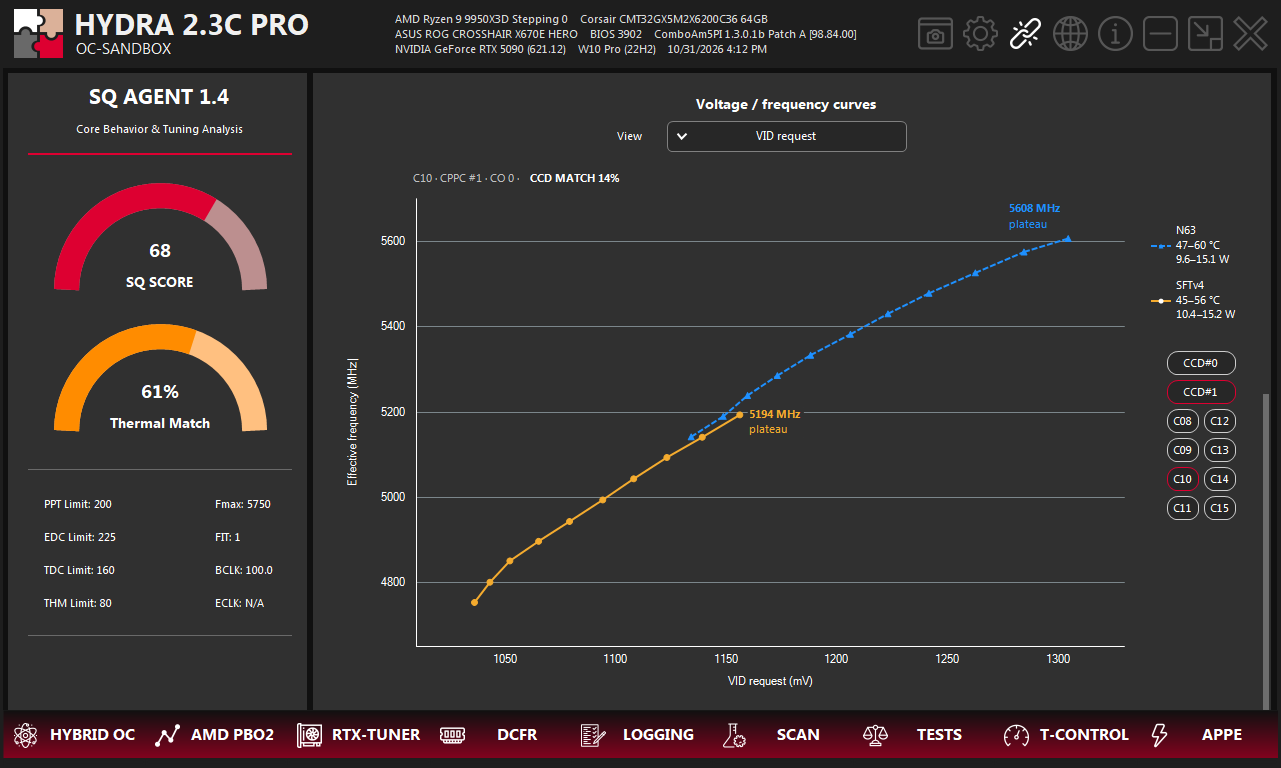
- 1View. VID request, or the difference from the CCD median in voltage (ΔVID), temperature (ΔTemperature) or power (ΔPOW).
- 2Core and CCD MATCH. The core, its CPPC rank, its CO during the run, and how close its curve is to the CCD median.
- 3Plateau. The clock where the core stopped gaining frequency in this load.
- 4Loads. N63 in blue and SFTv4 in yellow, with the temperature and power range of the core in each.
- 5CCD. Chooses the CCD whose cores are listed below.
- 6Cores. Shows both curves of a core; click the chosen core again to clear the chart.
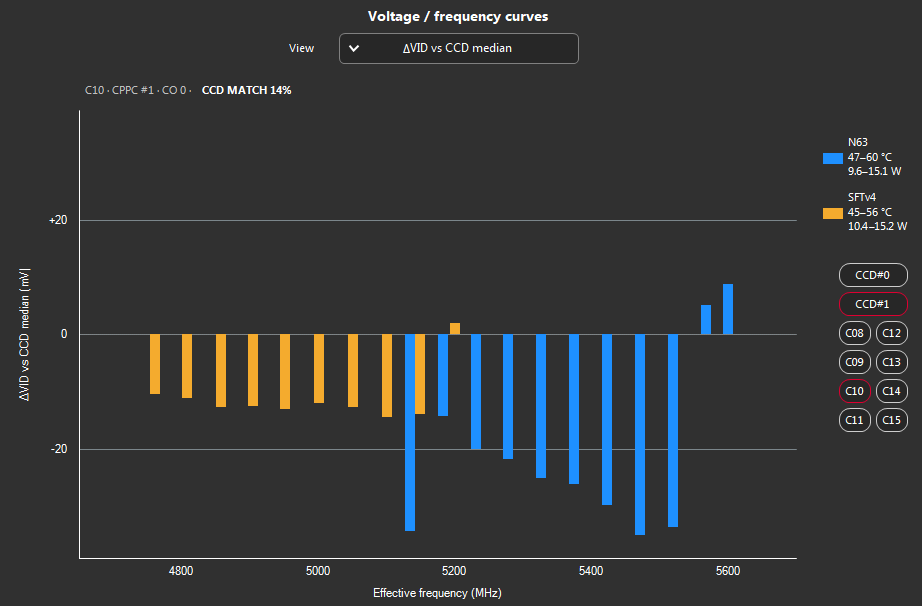
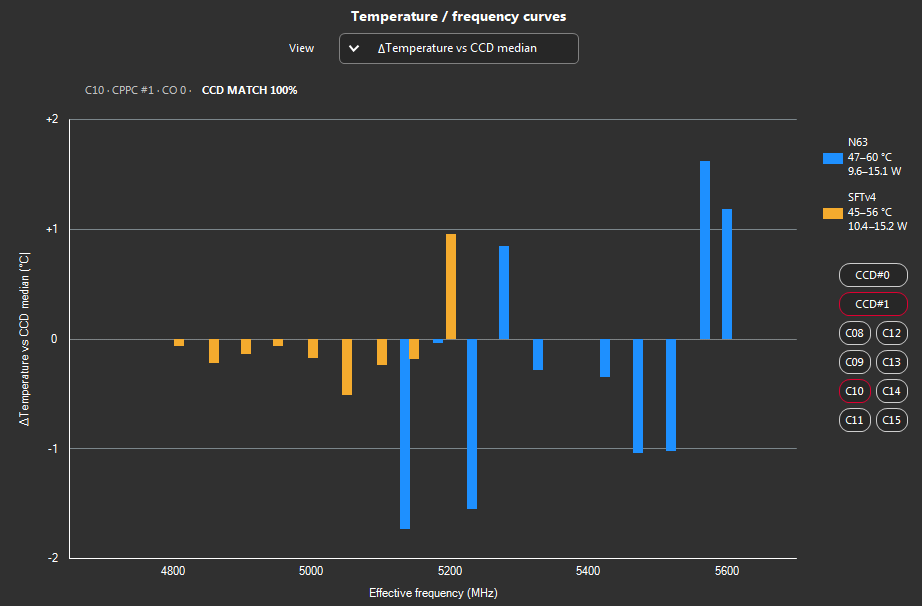
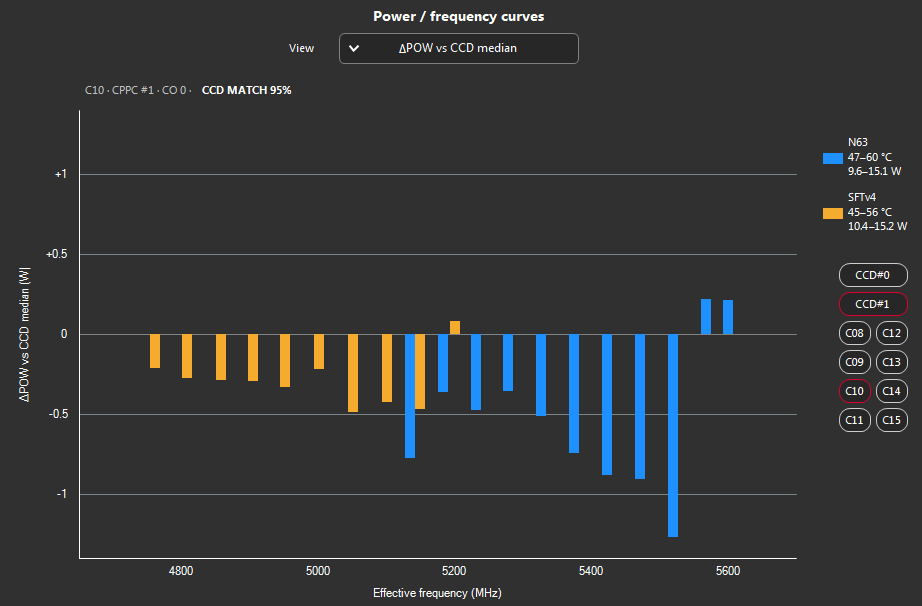
- VID request shows the silicon of each core: a better core reaches the same clock at a lower voltage, and the curves of a balanced CCD lie close together. The plateau is the highest clock the core reaches alone in that load.
- The horizontal axis is the effective clock the core really ran at, so points of different cores line up at the same clock.
- Each point is the median of a 6-second measurement. Steps that did not have enough valid readings are left out.
- The Δ views compare the core with the median of its CCD at the same clock, separately for N63 and SFTv4. Zero is the CCD median. At least two cores with data at that clock are needed; HYDRA does not extend a curve beyond its points.
- CCD MATCH is the share of points within ±10 mV, ±2 °C or ±1 W of the CCD median, averaged over N63 and SFTv4. VID request uses the voltage match. Higher means closer to the CCD median.
Heat and leakage
When a core runs hotter than its neighbors, the report helps tell why. The CCD tile shows TDE for the whole CCD; the CORE STATISTICS table in the HYDRA log lists it for every core, in the L%/O% column.
- Leakage. At the same clock the core draws more power than its neighbors (ΔPOW above zero) while asking for about the same voltage (ΔVID near zero); the first TDE number is higher. The extra heat comes from the core itself: higher leakage current is a property of that piece of silicon.
- Heat transfer. The core is hotter (ΔTemperature above zero) while its power is like its neighbors' (ΔPOW near zero); the second TDE number is higher. The heat leaves this part of the die poorly: check how the paste spreads and how evenly the cooler presses.
SQ AGENT compares the cores of a CCD with each other. A cooler that is weak for all cores alike lowers neither THM nor Thermal Match: for that, look at the temperatures themselves.
Good to know
- A plateau shows where a core stopped gaining clock, not why: the processor does not report the reason for its single-core limit.
- The steps run one after another without cooling pauses, so the temperature rises along a curve. This is intended.
- On Cezanne processors, such as the Ryzen 5000G series, SQ AGENT measures the all-core part only: the core curves need an Fmax control these processors do not have.
- A saved report keeps the core layout and the AMD PBO2 settings of its run.
Something wrong or missing on this page? Tell us in Discord.